 Skip to content





Unmasking Qilin: The Ransomware tactics you can’t afford to ignore
The ransomware group Qilin has cemented itself as one of the most prolific ransomware operations in the world. The group has claimed over 1900 victims on its leak site since its start and has continued listing victims at a rate of more than 100 per month into Q1 2026, dominating every public ransomware tracker.
Multiple sources rank Qilin as the busiest ransomware-as-a-service (RaaS) operation entering 2026, having absorbed affiliates from the disrupted RansomHub, LockBit and ALPHV/BlackCat operations.
This blog shares what Zensec (formerly Solace Cyber) has observed across multiple Qilin engagements handled by our DFIR teams. From the earliest recorded intrusion in mid-2022 through to attacks investigated in late 2025 and into 2026.
Background
Qilin first appeared in 2022 under the name Agenda, before rebranding and re-tooling. The group operates a double-extortion model: data is stolen first, then systems are encrypted, with payment demanded to prevent public leaks and to restore files. Affiliates use a Ransomware-as-a-Service (RaaS) platform, retaining 80–85% of any ransom paid, while the operators take the remainder for providing the payload, infrastructure, leak site and negotiation portal.
Their primary entry route is the perimeter VPN. Across Zensec engagements we have seen Qilin abuse Fortinet SSL VPN, SonicWall SSL VPN, Cisco AnyConnect and exposed RDP, almost always taking advantage of weak passwords, missing MFA, account reuse or unpatched appliances.
Once inside, Qilin’s affiliates leverage the same tools across multiple intrusions, the same staging directories, the same ransom note structure, and the same infrastructure providers appear across cases
Key observations across Qilin cases
These observations are drawn from Zensec DFIR engagements where Qilin was the confirmed adversary.
| Attack Stage | Key Findings |
| Initial Access | Public-facing VPN appliances — Fortinet SSL VPN, SonicWall SSL VPN, Cisco AnyConnect As well as, exposed RDP. Common contributing factors: missing MFA, weak or reused passwords, and unpatched firewalls vulnerable to CVE-2025-20362 and CVE-2025-20333. |
| Discovery | Advanced IP Scanner and Advanced Port Scanner in almost every case, supplemented by NetScan, PowerShell AD enumeration (`Get-ADComputer`) and bulk `ping` sweeps. |
| Privilege escalation | Scanning SYSVOL (Group Policy) for passwords, leveraging weak Domain Admin passwords, and credential dumping from LSASS / NTDS.dit. |
| Persistence & C2 | RMM tooling abuse, MeshAgent / MeshCentral, Splashtop, RustDesk, AnyDesk, Atera, Chrome Remote Desktop, plus OpenSSH for RDP tunnelling. |
| Lateral movement | RDP from the SSL VPN ranges, Impacket `psexec.py`, PsExec, and SSH for ESXi and NAS hosts. |
| Collection | WinRAR to stage data into `.rar` archives, often split into multi-part sets. |
| Exfiltration | Rclone to SFTP, Cyberduck to Backblaze B2, MEGAcmd to MEGA cloud, FileZilla to attacker-controlled FTP, and bandwidth-throttled transfers (e.g. 500 Mbps cap) to avoid detection. |
| Defence evasion | Manual uninstall of Antivirus Products, GMER, `HideUL.exe`, Windows Defender exclusions and deactivation, Windows event log cleared. |
| Impact | Encryption of Hyper-V hosts, ESXi datastores, backup servers and NAS. Per-victim payload names (E.G. company initials as payload name, custom extensions) and a generic `README-RECOVER-<EXT>.txt` ransom note. |
Insights from cases
Initial access
The primary method of initial access of Qilin cases observed utilised the SSLVPN of victim’s estates to enter their environments. In the minority of cases the threat actor group leveraged internet accessible RDP enabled endpoints to gain access.
In 2025 and 2026, the main method of entry seen by Zensec was the abuse of Cisco ASA, Fortigate and Sonicwall firewalls to gain initial access. In the majority of the cases, this likely due to the lack of MFA on accounts with no account lockout prevention in place as the majority were patched at the time of the attack and no known exploits were available at the time.
Discovery
Qilin’s discovery toolkit is small, predictable and built almost entirely from off-the-shelf utilities which defenders rarely block.
Advanced IP Scanner and Advanced Port Scanner were present in nearly every intrusion. The actor would commonly stage `advanced_port_scanner.exe` or `advanced_ip_scanner.exe` from `C:\Users\<user>\AppData\Local\Temp\`, run a sweep of the entire network ranges and write results to a CSV.
The use of Netscan / SoftPerfect NetScanner was seen in at least two cases.
In the minority of engagements, the actor ran `ping` commands from PowerShell, piping output into `c:\programdata\ping.txt` to enumerate every named host on the domain to ensure those devices were running.

Figure 1
PowerShell-based AD enumeration was also common, with one case capturing the full computer estate using:

Figure 2
Everything.exe and powershell commands utilising QUSER and ‘net user’ for reconnaissance were also observed.
Privilege Escalation / Credential Access
Qilin’s privilege escalation tradecraft is opportunistic.
Once inside the environment through the VPN, the threat actor may already have Active Directory (AD) credentials, depending on whether access was gained using a local firewall account or an AD account. Where valid credentials are insufficient to progress or more access is wanted by the group, Qilin have been observed to perform LSASS memory dumping using task manager. In addition to the use of Mimikatz has been seen in more than half of cases, enabling attackers to dump credentials from memory or conduct a DCSync attack to replicate password data directly from a domain controller. A technique to impersonate a domain controller and replicate password data from Active Directory. Alongside Mimikatz was occasionally the batch script “mimik.bat”.
The use of windows explorer to search and look for credentials has also been seen in cases to identify additional credentials by locating files containing passwords including within SYSVOL where group policy objects are stored and accessible to the account already acquired.
We have observed:
- Mimikatz utilised against LSASS, with Defender detecting `HackTool:Win32/Mimikatz.D` in some cases.
- Task Manager, LSASS dumps `lsass.dmp` files left on disk after the actor used the GUI right-click “Create dump file” option.
- NTDS.dit theft via volume shadow copies, copied off the domain controller for offline cracking.
- DCSync attacks, with Active Directory replication observed coming from a non-machine `Administrator` account.
Remote registry dumps, detected as `Behavior:Win32/RemoteRegDump.A`.
Persistence and C2 (Command and Control)
Qilin are well known at ZenSec to use methods of command and control, with methods varying per case and no predominant method identified other than generically RMM tools.
The following observations have been discovered with known RMM tools to be used by Qilin:
- Altera
- Splashtop
- RustDesk
- Mesh Central / MeshAgent
Another method in play is the use of OpenSSH for remote access, which was seen in the minority of cases in which protocol tunnelling where RDP activity was observed to originate from the OpenSSH process.
Lateral Movement / Execution
The most common method abused for lateral movement was Remote Desktop Protocol (RDP), where Zensec observed its use in all cases from the SSL VPN range to Windows hosts or from internet connected RDP hosts to the wider estate.
In cases where ESXi hosts are present or NAS devices, the threat actor is seen to use SSH for lateral movement to those devices for encryption purposes.
In approximately 50% of cases observed Qilin make use of PSExec a legitimate Microsoft Sysinternals utility that allows administrators to run processes on remote systems by creating a temporary service (PSEXESVC). In at least one case the threat actor made use of the impacket psexec.py tool.
Defence Evasion
Where the threat actor is targeting the Windows operating system for later encryption, the majority have manual removal and disablement of security tooling where the threat actor has obtained sufficient administrator privileges and where no password protection measures preventing the removal of Antivirus products or EDR products were seen. The simple use of the control panel and pressing uninstall is enough in sadly a large portion of cases.
The Qilin ransomware payload itself cleared windows artifacts in an attempt to inhibit forensic analysis of the environment including Windows Event Logs.
Additionally, in the minority of cases GMER was used to locate antivirus software and potentially used to inhibit the software.
In the remaining cases where no hindrance to the threat actor was observed, defence evasion techniques were not observed and were likely considered unnecessary, as the ransomware was executed directly and exclusively on the hypervisors’ datastores containing the virtual machine disks. This limited the need for traditional evasion, with encryption occurring directly on the ESXi hosts or Hyper-V hosts.
Collection
Before exfiltration, the threat actors were observed to use compression utilities in approximately have of the cases observed prior to exfiltration activities. The following utilities were utilised by Qilin in Zensec cases:
- WinRAR
- 7-Zip
Usually, these compression utilities would be run on file servers to selectively archive document types and ages.
Exfiltration
Usually, the length of time that Qilin is in the environment doesn’t depend on the speed of the victims upload. The following utilities were leveraged for exfiltration purposes:
- MegaSync / MegaCMD
- Rclone
- FileZilla
- Splashtop (RMM) – for use for ingress and exfiltration.
- Cyberduck
In the case of Splashtop the use was limited and the threat actor utilised additional methods of exfiltration.
If Rclone is used the threat actor commonly executes the tool with command prompt and from the directory of “C:\ProgramData\tmp\rclone.exe”. With Rclone the use of SFTP is common where zensec have identified configuration files containing SFTP credentials left by the threat actors within “rclone.conf”.
Encryption / Impact
During incidents, it has been observed that Qilin targets backup devices and systems relating to backups, including QNAP devices or other generic NAS devices that were linked to backup servers. In at least one case the threat actor was observed to utilise an ARM based ransomware payload to directly run the encryptor on the NAS itself. The file name starts off with the company name plus “REDACTED_armv7_armv7-a”.
The Windows variant of the ransomware payload performs wallpaper changes in cases of Qilin it appears to be more common to be successful than other ransomware payloads. With both desktop and logon wallpapers changed to “Your system has been blocked by Qilin Ransomware”. Additionally in cases where Zensec have been on site it was observed that the network printers also print the ransomware note. Windows ransomware payloads commonly have the organisation name or initials of the victim as the file name and have been observed to run out of “C:\ProgramData\”. During cases Zensec were able to retrieve log files generated by the Qilin ransomware payload from “C:\Users\REDACTED\AppData\Local\Temp\QLOG\”. This allows the attacker to monitor the encryption process.
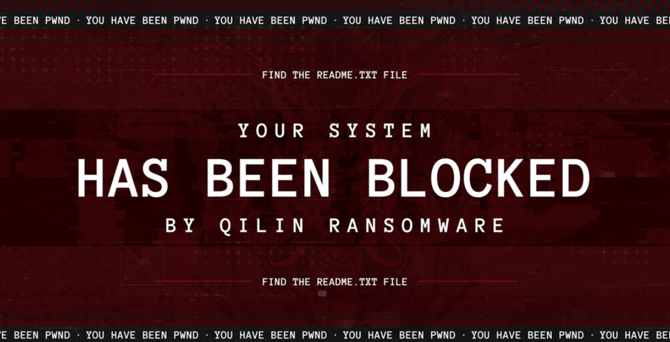
Figure 3
The Windows ransomware payload was also seen to resume encryption on startup where the ransomware payload creates registry keys to continue encryption with an autorun for example:
“HKLM\SOFTWARE\MICROSOFT\WINDOWS\CURRENTVERSION\RUN\\*ytkllf” the key value contains the ransomware executable path and command line to continue encryption upon every reboot. The last 6 characters of the key are random.
Another common attribute identified during examination is the windows event logs of devices are cleared as an anti-forensic method by the ransomware payload.
Due to Qilin targeting hypervisors, it isn’t always necessary for the group to disable security products on hosts. Once on ESXi hosts with SSH enabled, there aren’t many measures that will stop the RaaS group from running the Linux variant.
The method of encryption can vary, where scenarios can include:
- Virtual Disk–Level Encryption (Endpoints Unaffected)
- Core virtual machines are encrypted at the virtual disk level (VMDKs and VHDXs)
- Endpoints (laptops/desktops) are typically left unencrypted
- Full Environment Encryption
- Both servers/endpoints at the OS layer (Applications and data) and virtual disks within Hyper-V or ESXi are encrypted (VMDKs and VHDXs).
- In-Guest Encryption Only / Physical Devices
- Virtual disks remain untouched
- Instead, the ransomware operates within the VMs, physical servers, and endpoints, encrypting their contents (Applications and data)
The names for the ransomware payload are usually with short names or the full name of the org. For example, Joe Blogs LTD would be “jb.exe” or “joeblogs.exe”.
Windows
The method of execution can vary, where the threat actor predominantly runs the encryptor using PowerShell or Command Prompt as an administrator account. The execution of the Qilin payload on Windows devices can sometimes provide a forensic artefact where the encryptor leaves multiple log files usually within “C:\Users\REDACTED\AppData\Local\Temp\QLOG\” with the naming convention of: “ThreadID.log” and “ThreadID(1).log”.
An excerpt from the ThreadID.log shows the following.
Excluded file extensions (That are not encrypted)
extension_black_list: [“themepack”, “nls”, “diapkg”, “msi”, “lnk”, “exe”, “scr”, “bat”, “drv”, “rtp”, “msp”, “prf”, “msc”, “ico”, “key”, “ocx”, “diagcab”, “diagcfg”, “pdb”, “wpx”, “hlp”, “icns”, “rom”, “dll”, “msstyles”, “mod”, “ps1”, “ics”, “hta”, “bin”, “cmd”, “ani”, “386”, “lock”, “cur”, “idx”, “sys”, “com”, “deskthemepack”, “shs”, “theme”, “mpa”, “nomedia”, “spl”, “cpl”, “adv”, “icl”, “msu”]
Targeted file extensions (Files to Encrypt)
extension_white_list: [“mdf”, “ldf”, “bak”, “vib”, “vbk”, “vbm”, “vrb”, “vmdk”, “abk”, “bkz”, “sqb”, “trn”, “backup”, “bkup”, “old”, “tibx”, “pfi”, “pvhd”, “pbf”, “dim”, “gho”, “vpcbackup”, “arc”, “mtf”, “bkf”, “dr”]
File names excluded from encryption (That are not encrypted)
filename_black_list: [“desktop.ini”, “autorun.ini”, “ntldr”, “bootsect.bak”, “thumbs.db”, “boot.ini”, “ntuser.dat”, “iconcache.db”, “bootfont.bin”, “ntuser.ini”, “ntuser.dat.log”, “autorun.inf”, “bootmgr”, “bootmgr.efi”, “bootmgfw.efi”, “#recycle”, “autorun.inf”, “boot.ini”, “bootfont.bin”, “bootmgr”, “bootmgr.efi”, “bootmgfw.efi”, “desktop.ini”, “iconcache.db”, “ntldr”, “ntuser.dat”, “ntuser.dat.log”, “ntuser.ini”, “thumbs.db”, “#recycle”, “bootsect.bak”]
Excluded paths (Directories that are excluded from encryption)
directory_black_list: [“windows”, “system volume information”, “intel”, “admin$”, “ipc$”, “sysvol”, “netlogon”, “$windows.~ws”, “application data”, “mozilla”, “program files (x86)”, “program files”, “$windows.~bt”, “msocache”, “tor browser”, “programdata”, “boot”, “config.msi”, “google”, “perflogs”, “appdata”, “windows.old”, “appdata”, “..”, “.”, “boot”, “windows”, “windows.old”, “$recycle.bin”, “admin$”]
Services to be killed
win_services_black_list: [“vmms”, “mepocs”, “memtas”, “veeam”, “backup”, “vss”, “sql”, “msexchange”, “sophos”, “msexchange”, “msexchange\\$”, “wsbexchange”, “pdvfsservice”, “backupexecvssprovider”, “backupexecagentaccelerator”, “backupexecagentbrowser”, “backupexecdivecimediaservice”, “backupexecjobengine”, “backupexecmanagementservice”, “backupexecrpcservice”, “gxblr”, “gxvss”, “gxclmgrs”, “gxcvd”, “gxcimgr”, “gxmmm”, “gxvsshwprov”, “gxfwd”, “sapservice”, “sap”, “sap\\$”, “sapd\\$”, “saphostcontrol”, “saphostexec”, “qbcfmonitorservice”, “qbdbmgrn”, “qbidpservice”, “acronisagent”, “veeamnfssvc”, “veeamdeploymentservice”, “veeamtransportsvc”, “mvarmor”, “mvarmor64”, “vsnapvss”, “acrsch2svc”, “(.*?)sql(.*?)”]
Upon encryption, the ransomware payload appends files with a t matches the 10-character number and letter used within the ransom note filename. Within each folder where the encryptor has run, it dumps a TXT file called “README-RECOVER-[10char].txt”. This applies in both ESXi and Windows environments.
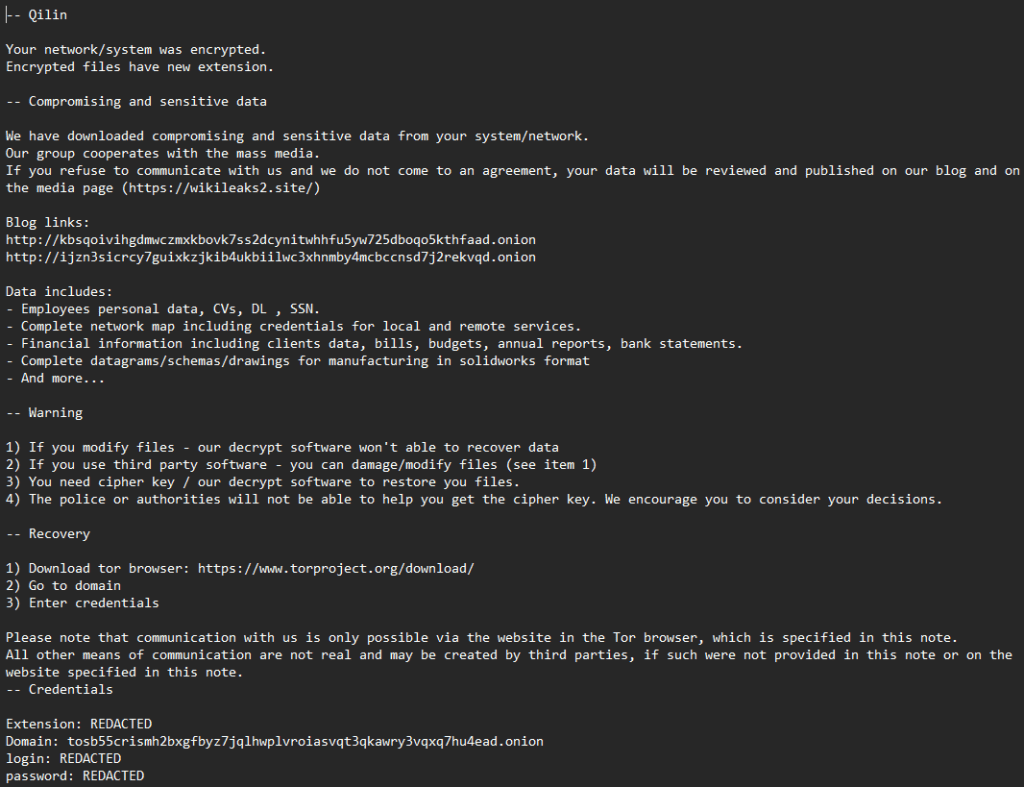
Figure 4
Post Encryption
After the encryption has set its course, occasionally the victim organisation is contacted. In most cases, this is a mass email to the senior leadership team of the organisation. Observed emails through multiple cases came from the domain bizalerts[.]de. With subject lines such as: “Final reminder: Data publication planned in X days”
Usually, the email contains a copy of the ransomware note.
How do Qilin publish the data?
Qilin publish victims to an onion (tor) based website referred to as a data leak site (DLS) usually included within the ransomware note.
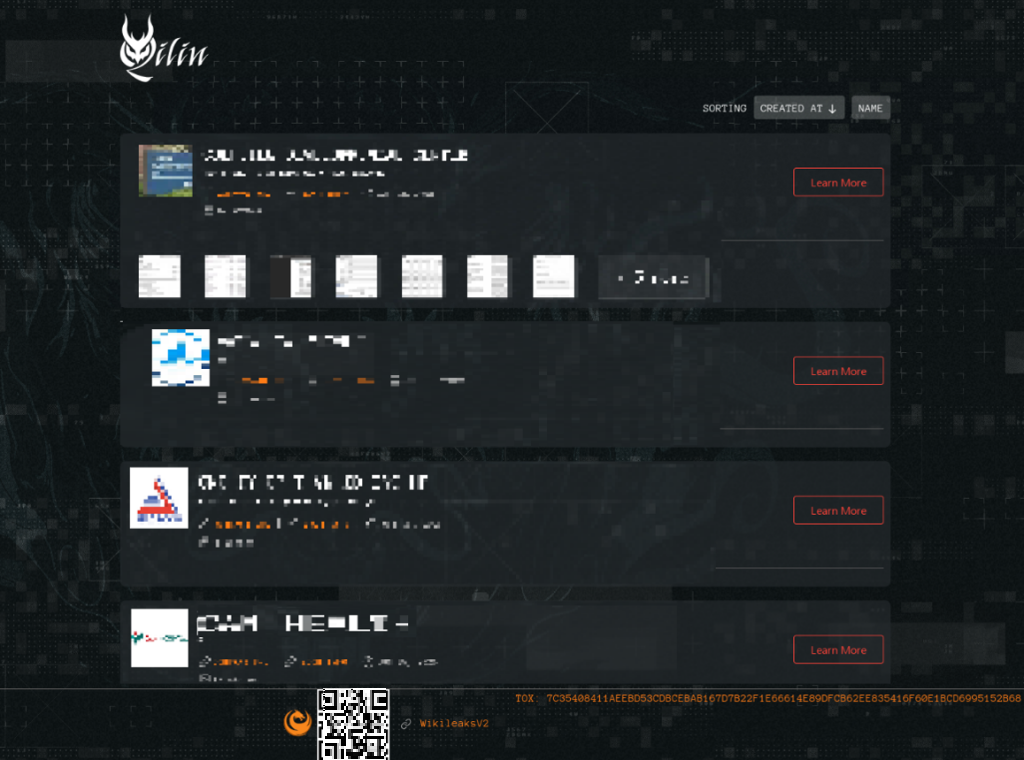
Figure 5
Qilin, in most cases, where the exfiltrated, data is acquired, will list the organisation in a two-stage approach usually a listing will appear with the victim organisation after a few days including example documents of what they’ve obtained during the exfiltration stage. The leak site usually will have a countdown timer where when this reaches zero the site will display published. Where the link to the leaked data is usually provided. Data availability after the countdown is inconsistent where some victims data is never actually listed on the Qilin Data Leak Site even though it will say it is published.
Mitre Attack Flow Map
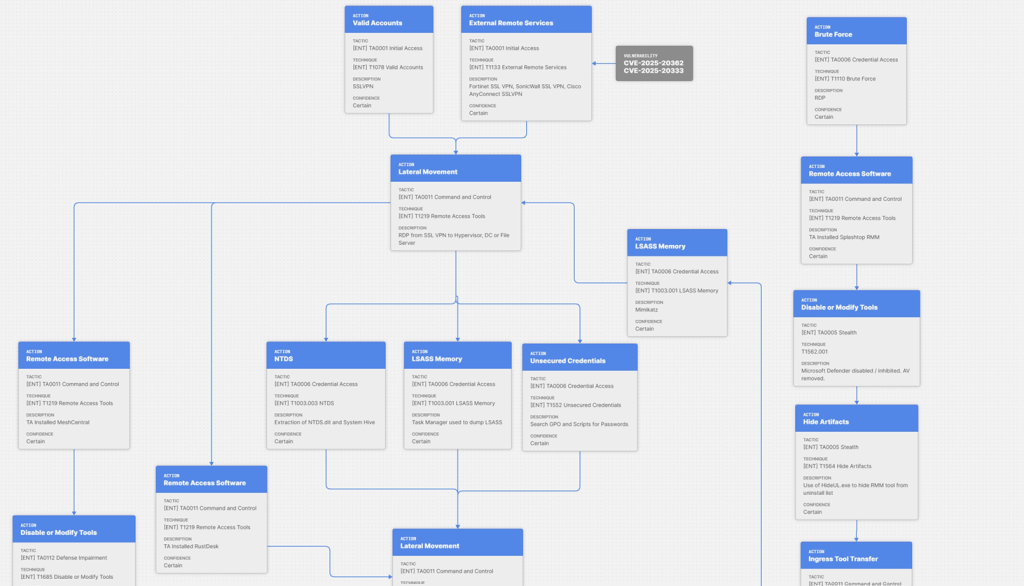
The full map can be seen here.
Qilin IOCs
Dual-use tools are present in the IOCs below. The indicators below may reflect such legitimate utilities within your environment. Handle with care.
ASNs observed
| ASN | Org |
| AS43350 | NForce Entertainment B.V. |
| AS209588 | Flyservers S.A. |
| AS47217 | Planetel SPA |
| AS395092 | Shock Hosting |
| AS14956 | RouterHosting |
| AS9009 | Mullvad VPN |
| AS39351 | 31173 Services AB |
File-based IOCs
| File | SHA-256 |
| MEGAsyncSetup.exe | 3b7e78f522ecefd3fbd3435a762666b0189e08d3742fc020f1a445ee5c56d74e |
| netscan.exe | fefb897d1d63a7bd3c3fde0c18fb0037a3dbb85e39ed0da391d141be4b1082bf |
| nircmd-x64.zip | N/A |
| FileZilla.xml | N/A |
| advanced_ip_scanner.exe | 1e675a17812da93b4404668a246d7f5623b899f641b9d8851046e48239193154 |
| MeshAgent.exe | ccecec4b0943249115db03694c2a6ed089715679d490863a88a938ec7b3654a1 |
| dfxmkrin.exe | e8a3e804a96c716a3e9b69195db6ffb0d33e2433af871e4d4e1eab3097237173 |
| rclone.exe | 54e3b5a2521a84741dc15810e6fed9d739eb8083cb1fe097cb98b345af24e939 |
| ping.txt | N/A |
| WinRAR.exe | N/A |
| Cyberduck-Installer-9.3.0.44071.exe | N/A |
| cyberduck.exe | N/A |
| AllWindows.csv | N/A |
| winrar-x64-713.exe | N/A |
| README-RECOVER-10chars.txt | N/A |
| AteraHIDE.bat | N/A |
| AteraReinstall.bat | N/A |
| netscan_setup.exe | N/A |
| Port_Scanner.exe | N/A |
| megasyncsetup64.exe | N/A |
| HIDEUL.EXE | N/A |
| ADVANCED_PORT_SCANNER.EXE | N/A |
| PSEXESVC.exe | N/A |
| PSEXEC.exe | N/A |
| Advanced_Port_Scanner_2.5.3869.exe | N/A |
| mimikatz.exe | N/A |
| SRManager.exe | N/A |
| mimik.bat | N/A |
Recommendations for all organisations
- Keep all internet-facing firewall and SSL VPN appliances (Fortinet, SonicWall, Cisco ASA / AnyConnect) patched to the latest firmware, prioritising actively exploited vulnerabilities such as CVE-2025-20362 and CVE-2025-20333.
- Enforce MFA on every SSL VPN and remote-access account, with no exemptions.
- Remove direct RDP exposure to the internet and place all remote administration behind the VPN or a hardened jump host.
- Apply account lockout and brute-force protection on both the firewall / SSL VPN and Active Directory.
- Ensure no domain administrator-level accounts are able to authenticate to the SSL VPN.
- Forward firewall, SSL VPN and endpoint logs to an external location from the device.
- Implement 24/7 security monitoring so alerts are actioned outside business hours.
- Deploy EDR across the entire estate, including servers and hypervisor management hosts and alert on unusual PowerShell, discovery scanning and credential-access activity.
- Enable tamper / password protection on antivirus and EDR so privileged users cannot silently uninstall or disable protection from the Control Panel.
- Protect LSASS using Credential Guard / LSA protection (RunAsPPL) to hinder memory dumping and Mimikatz.
- Remove plaintext and Group Policy Preference passwords from SYSVOL and restrict read access to GPO content.
- Enforce strong, unique Domain Admin passwords and adopt tiered administration to limit credential reuse.
- Maintain an allow-list of approved RMM tools and block or alert on all others (Atera, Splashtop, RustDesk, AnyDesk, MeshCentral / MeshAgent, Chrome Remote Desktop).
- Monitor for unexpected OpenSSH use on Windows hosts, which Qilin uses for RDP tunnelling.
- Alert on dual-use discovery and transfer tooling such as Advanced IP / Port Scanner, NetScan, Rclone, MEGAcmd, FileZilla, Cyberduck and WinRAR.
- Restrict and monitor lateral RDP, PsExec and Impacket use between hosts, and network-segment server management and hypervisors from general user VLANs.
- Harden ESXi and Hyper-V hosts: disable SSH unless actively required, enable ESXi lockdown mode and restrict management to a dedicated segment.
- Keep onsite backups off the domain and maintain at least one immutable, off-site backup copy. Follow the 3-2-1 rule.
- Patch backup products, NAS and QNAP devices to the latest level
- Monitor and restrict outbound traffic to cloud storage and file-transfer destinations used for exfiltration where not used legitimately for any business process (MEGA, Backblaze B2, arbitrary SFTP / FTP).
References:
- https://www.sans.org/blog/evolution-qilin-raas
- https://github.com/BushidoUK/Ransomware-Tool-Matrix/blob/main/GroupProfiles/Qilin.md
- https://redpiranha.net/news/qilin-ransomware-all-you-need-know
- https://www.kelacyber.com/blog/who-is-the-qilin-ransomware-group-and-how-do-they-operate
- https://www.hhs.gov/sites/default/files/qilin-threat-profile-tlpclear.pdf
- https://www.ransomware.live/group/qilin