 Skip to content
How RMM abuse fuelled Medusa & DragonForce attacks

If you are reading this because you have experienced a ransomware incident and need help with ransomware data recovery, contact Zensec immediately.
Summary
In early 2025, Zensec investigations uncovered a wave of ransomware incidents exploiting the SimpleHelp Remote Monitoring and Management (RMM) platform, a tool trusted by Managed Service Providers (MSPs) and software vendors worldwide. Threat actors, including the Medusa and DragonForce ransomware groups, weaponised a trio of vulnerabilities (CVE-2024-57726, CVE-2024-57727, and CVE-2024-57728) to gain downstream access into customer environments.
By compromising third-party RMM servers running as SYSTEM, attackers achieved full control over victim networks, deploying discovery tools, disabling defences, exfiltrating data via RClone and Restic, and finally encrypting systems.
These campaigns illustrate a growing reality: your security is only as strong as your supplier’s patch hygiene. This report breaks down how two ransomware RaaS groups used exploited SimpleHelp instances, what tools and tactics they used, and what every organisation should do now to defend against similar supply-chain intrusions.
This report is split into two parts for both ransomware groups.
Background on SimpleHelp
SimpleHelp is a remote monitoring and management (RMM) platform commonly used by MSPs and software suppliers to manage customer endpoints and servers. From January 2025 onward multiple intrusions traced back to compromised SimpleHelp servers running unpatched versions affected by CVE-2024-57726 / CVE-2024-57727 / CVE-2024-57728.
Where the controlling RMM within environments ran as SYSTEM, attackers could act with a high level of privilege including that of key assets (e.g. domain controllers) and reach downstream customers with minimal friction. Patches for SimpleHelp have been available and exploits dubbed “Severe” by the RMM software vendor.
Who abused SimpleHelp for ransomware deployment?
Medusa – In Q1 2025, multiple UK organisations fell victim to a coordinated ransomware campaign by the Medusa ransomware RaaS. The attackers leveraged vulnerabilities in the SimpleHelp Remote Monitoring and Management (RMM) tool to gain initial access via suppliers and MSPs using their own tools to manage customers. From there the threat actor pivoted into victim networks. In half of the cases data was exfiltrated using RClone before encryption, with large outbound data spikes being observed and file tree listings appearing on Medusa’s dark web leak site days later. Across all attacks, systems were encrypted with the “.MEDUSA” file extension, and ransom notes titled “!!!READ_ME_MEDUSA!!!.txt” were left on infected machines.
Dragon Force – In Q2 2025, multiple UK organisations fell victim to a coordinated ransomware campaign by the Dragon Force ransomware as a Service (RaaS) group. They’re a relatively new group starting up in 2023. The attackers leveraged vulnerabilities in the SimpleHelp Remote Monitoring and Management (RMM) tool to gain initial access to supplier controlled RMM tools. From there the threat actor pivoted into victim networks. In all cases observed by ZenSec data was exfiltrated using a tool called Restic before encryption, with large outbound data spikes being observed. Across all attacks, systems were encrypted with the “*.dragonforce_encrypted” file extension, and ransom notes titled “readme.txt” were left on infected machines. In these cases, file names were also obscured with the random characters equalling the same length of characters as the original file name.
Medusa campaign analysis
Initial access & abuse of SimpleHelp
In all observed incidents the initial access vector was an unpatched or misconfigured SimpleHelp RMM instance belonging to a third-party supplier or MSP. Because all observed instances of SimpleHelp installs run with SYSTEM-level privileges, attackers were able to use the compromised controlling RMM server of the third-party as a staging point to reach downstream customer environments with minimal friction once logged into the victims to perform the attack.
Execution and lateral movement
Once into the network using SimpleHelp the threat actor Medusa deployed multiple service installations for PDQ Inventory and PDQ Deploy which were observed in half of the cases. These tools were then utilised to execute the ransomware payloads “Gaze.exe” or “REDACTED.exe” where the redacted name is that of the target organisation. Gaze is also referenced in multiple other MEDUSA public sources including CISA reports.
PDQ Deploy Weaponisation
PDQ Deploy was leveraged to push and run base64-encoded PowerShell commands that disabled or altered Microsoft Defender and added Defender exclusions.

Figure 1 – Encoded

Figure 2 – Decoded
PDQ was also used to add exclusions and modify Windows Defender utilising the following PowerShell commands:

Figure 3
In the remaining cases, the ransomware payload was directly executed via the RMM tool SimpleHelp without PDQ being required.
Discovery tooling
Early in some intrusions the actors ran network discovery tooling such as netscan.exe to enumerate hosts and services, enabling targeted lateral movement and prioritisation of high-value targets (file servers, backup servers, domain controllers).
Persistence and C2 (Command and Control)
While the SimpleHelp compromise often provided sufficient access, in several cases attackers added additional remote management/C2 channels:
- AnyDesk was installed and used for interactive control in some incidents (binary observed as AnyDesk.exe).
- In at least one incident the attackers repointed SimpleHelp clients to a threat-actor-controlled SimpleHelp server (observed IP: 213[.]183.63.41) to maintain access independent of the initial vendor instance.
Because SimpleHelp runs as SYSTEM in many deployments, these actions provided robust, high-privilege persistence without the need for any further C2.
Exfiltration
The threat actor group Medusa used RClone for file theft, renaming the binary to evade naive detections (observed as lsp.exe). In the cases we analysed RClone was used with filters to transfer files matching specific age/size criteria (e.g., “files over 1500 days old and under 1500MB”, a likely attempt to prioritise user data while avoiding vary large unneeded data). Operators also removed RClone configuration files post-exfiltration to hinder forensic recovery.
Note: ZenSec observed exfiltration in approximately 50% of the Medusa incidents analysed; in other cases, the campaign relied on encryption-only disruption. The attackers deleted RClone configuration files after execution to hinder forensic recovery.
The following commands were used with Rclone (lsp.exe) after a successful RDP session to the file servers within the environment.

Encryption and impact
Encryption occurred on the majority of online systems within the victims networks facilitated manually or via PDQdeploy. In addition, multiple defence evasion techniques using PowerShell to disable Defender and “2Gk8.exe” with related drivers also inhibited traditional AV products. One driver utilised that goes by multiple names “smuot.sys” and “CSAgent.sys” has been dubbed as Abyssworker by Elastic Security Labs.
Where encryption had taken place, the ransomware readme was dropped as “!!!READ_ME_MEDUSA!!!.txt” and files encrypted were appended with the following extension “.MEDUSA”.
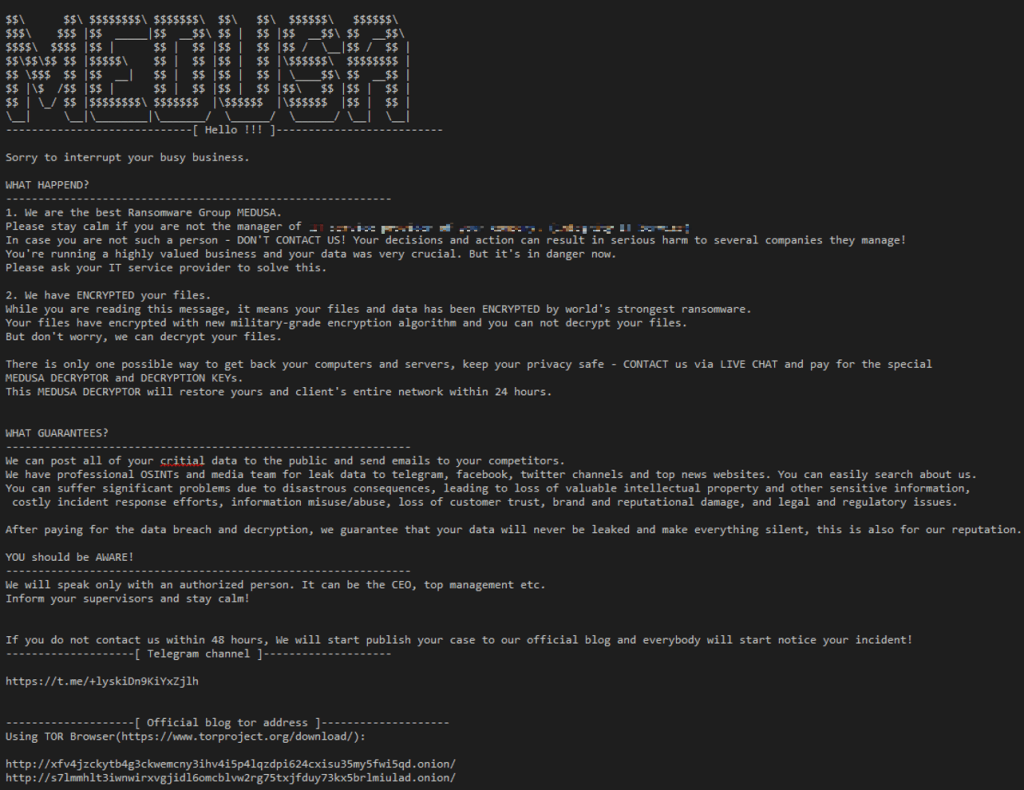
Post-encryption activity & leak site behaviour
Medusa operates as a Ransomware-as-a-Service (RaaS) and commonly enacts double extortion. Victim organisations were listed on the group’s data leak site with “proof-of-life” packs: screenshots, document previews, and browsable file trees. The leak site and peripheral Telegram channels were used to pressure victims and sometimes to publish larger sets of stolen data.

Figure 4 – hxxp://s7lmmhlt3iwnwirxvgjidl6omcblvw2rg75txjfduy73kx5brlmiulad[.]onion/
Until recently the data wasn’t directly published to the darknet leak site other than proof of life data however various telegram channels linked to the group listed the files such as the previously linked telegram channel named “information support aka OSINT without boarders”.
The Medusa leak site is functional at the time of writing with many victims published. The link is found at the top of the site hyperlinked. Alongside the DLS link is a link for osintcorp[.]net a site no longer available and last indexed by the Internet Archive (Wayback Machine) in April 2025. This site was an online presence for the group pretending to be a cyber security news site. The threat actors would public videos to this site documenting the leaks sometimes as long as 20 minutes long scrolling through documents of victims.

Figure 5 – hxxp://7aqabivkwmpvjkyefonf3gpy5gsubopqni7kcirsrq3pflckxq5zz4id[.]onion/
Medusa Mitre Attack Flow Map
The full map can be seen here.

DragonForce campaign analysis
Initial access via abused RMM
In the observed incidents DragonForce similarly abused compromised SimpleHelp installs belonging to MSPs and third-party suppliers. Using the elevated access afforded by those RMM instances, operators installed additional remote access tools (notably AnyDesk) and created local administrator accounts “admin” to retain interactive control and simplify lateral movement.
Because compromised RMM instances often run with SYSTEM privileges, DragonForce’s operator-controlled agents could transfer files, run tooling, and stage payloads without needing additional command and control or additional persistence in most cases.
Additionally in order to run tooling and ingress malicious files into the environment DragonForce disabled security protections like Microsoft Defender on systems.
Credential harvesting from Veeam
To escalate access and harvest backup credentials, DragonForce operators executed credential-harvesting scripts targeting Veeam backup servers. Variants of Get-Veeam-Creds.ps1 were used to extract plaintext credentials from Veeam SQL password stores and configuration artefacts.
Exfiltration
Unlike the Medusa cases where RClone was common, DragonForce frequently used Restic, an open source backup tool to move data offsite. Restic supports multiple backends (S3-compatible endpoints, SFTP, Azure, Google Cloud), and in the incidents we reviewed the group targeted S3-compatible storage with references to wasabisys[.]com (a known S3-compatible cloud storage provider and backup provider). Essentially the victims were provided an unscheduled off-site backup. In jest this is the threat actor exfiltrating the data to their controlled storage.
The service URLs matched that of those on Wasabi products storage regions found here https://docs.wasabi.com/docs/what-are-the-service-urls-for-wasabi-s-different-storage-regions. Restic was launched with PowerShell by the threat actor.
Encryption / Impact
The ransomware payload was launched using the threat actor created accounts, in cases examined ransomware payloads can be called “organisation name.exe” where the file name is specific to the company and “win.exe”. File ingress of the ransomware payload can be seen using the built in functionality of SimpleHelp file transfer.
Encryption occurred on the majority of online systems within the victim’s networks facilitated manually in the cases witnessed targeting Hyper-V VHDX files of servers.
As ordinarily encountered in ransomware attacks, the DragonForce ransomware payload places a ransom note on the affected system(s) with details of what has occurred, what not to do and how to contact them, as well as the consequences of failing to negotiate a settlement. During this attack, a ransom note named “readme.txt” was placed in numerous folders on the various systems upon which encryption had taken place. Files encrypted were appended with the following extension “*.dragonforce_encrypted” and file names obscured with random characters. It is a ransom note with no direct reference to the client and contains a link to follow on how to contact the ransomware group via a TOX ID chat.
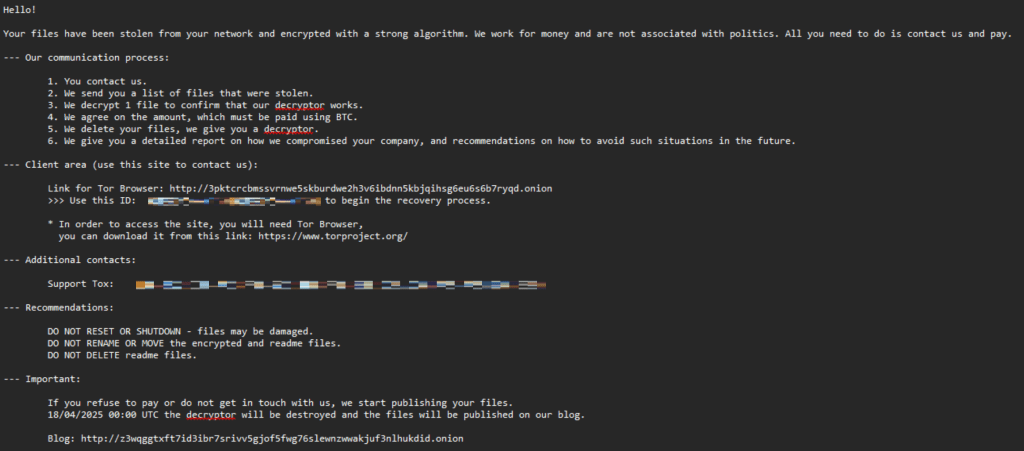
Figure 6
Post Encryption
DragonForce operates as a RaaS and carries out double extortion. Victims are first previewed or listed on a public-facing blog, then later published to a data leak site (DLS) where files are browsable and downloadable.

Figure 7 – Blog site – z3wqggtxft7id3ibr7srivv5gjof5fwg76slewnzwwakjuf3nlhukdid[.]onion

Figure 8 – Data Leak Site – dragonforxxbp3awc7mzs5dkswrua3znqyx5roefmi4smjrsdi22xwqd[.]onion
